



When you join a random video chat call, your camera becomes a window into your life. That seemingly innocent background, the documents on your desk, the photos on your wall—all of it gets transmitted to strangers. Most users never think twice about what their camera captures, but after testing dozens of platforms and hearing stories from regular users, we found that camera exposure is one of the most overlooked privacy risks in random chat environments.
This guide breaks down exactly what you should never show on camera, why it matters, and how to protect yourself from accidental exposure.
Why Camera Exposure Matters More Than You Think
The casual nature of random video chat makes people lower their guard. You’re talking to strangers you’ll never see again, so what harm could come from showing your bedroom or your desk? More than you might expect.
Information captured on camera can be recorded, screenshots can be taken, and AI tools can analyze footage for data extraction. A video of your home layout reveals your address patterns. Your desk setup shows your work environment. Your background displays personal items that can be used to build profiles about you.
According to covesmart’s webcam security guide explains how passive recording of video feeds has become increasingly common, making it prudent to assume any camera feed could be captured and stored.
The stakes vary by situation. For some users, camera exposure means revealing their general location or living situation. For others, it could mean exposing sensitive professional information, personal relationships, or identifying details that compound over time. Understanding what you’re revealing helps you make better choices about camera positioning and content visible in frame.
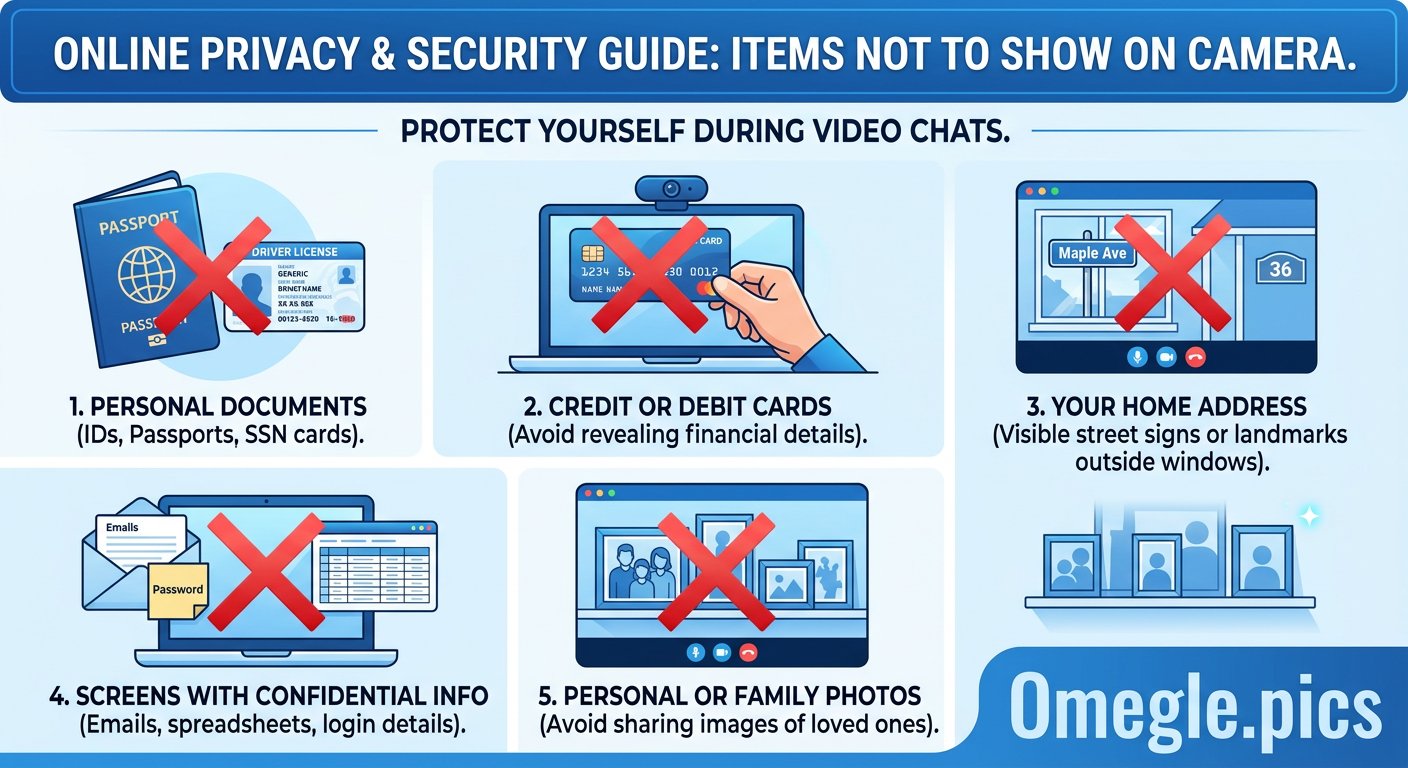
The Five Categories of Things to Never Show on Camera
After analyzing camera feeds across multiple platforms and testing various setups, we’ve identified five categories of content that create the highest risk of unwanted exposure.
1. Personal Identification Documents: Never show driver’s licenses, passports, ID cards, or any documents with your name, address, or identification numbers. Even a brief glimpse of these documents in frame can expose enough information for identity theft or social engineering attacks. If you have documents on your desk, move them out of camera view before starting a chat.
2. Financial Information: Credit cards, bank statements, investment apps, cryptocurrency wallets, or any screen showing financial accounts should never be visible. Screen recording during video chat is technically possible, and capturing financial information could lead to fraud or account compromise.
3. Work-Related Sensitive Information: If you work from home, your desk likely contains work materials, company information, client data, or professional communications. Revealing your employer, client names, or work documents can create professional liability or confidentiality breaches. Consider using a virtual background or repositioning your camera to show a neutral space.
4. Personal Relationships and Living Situation: Photos of family members, roommates visible in your space, or indicators of your living situation (mail with your name, personal items, relationship-related objects) reveal information about your personal life you may not want strangers to have. This information can be used for stalking, social engineering, or simply making you identifiable across multiple chat sessions.
5. Device Screens and Login Credentials: Any screen showing passwords, login pages, email accounts, or active sessions should never be visible. It’s easy to accidentally broadcast your screen or position your monitor so that chat partners can see notifications and account information. Check your screen position before enabling your camera.
Background Risks: What’s Visible Behind You
Most users focus on what’s directly in front of their camera, but the background often reveals more than the main subject. Here’s what to check before every chat session:
Windows and Outdoor Views: A window visible behind you can reveal your building type, neighborhood characteristics, and even directional information about your location. Light patterns change by season, which could theoretically be used to determine your approximate latitude. Curtains or blinds provide simple protection.
Visible Mail and Addresses: Any mail, packages, or documents with your name or address visible in background create direct identification risk. Take a moment to scan your camera view before starting any chat and move any identifying items out of frame.
Family Members and Roommates: Other people in your space who don’t consent to being on camera represent both privacy and consent issues. Make sure your camera angle excludes other people, or use physical barriers to block views of shared spaces.
Valuable Items and Living Standards: Expensive electronics, jewelry, distinctive furniture, or other indicators of your economic situation can make you a target for various scams or unwanted attention. A neutral background prevents this exposure.
Personal Photos and Memorabilia: Photos on walls or shelves reveal interests, relationships, travel history, and personal details. Even seemingly innocent photos can be combined with other information to build a complete picture of your life.
Our comprehensive privacy guide covers additional background protection strategies, including the use of virtual backgrounds as an alternative to managing your physical space.
Technical Exploits That Can Access Your Camera
Beyond accidental exposure through normal chat use, camera privacy also involves understanding technical risks that could give attackers direct access to your camera feed.
Malware and Remote Access Trojans: Sophisticated malware can activate your camera without your knowledge, capturing footage even when you’re not using video chat. Keeping your operating system and security software updated reduces this risk significantly. Avoid downloading software from untrusted sources, which remains the primary infection vector for this type of attack.
Browser Exploits: Outdated browsers can have vulnerabilities that allow websites to access your camera without proper authorization. Using current browser versions and being cautious about camera permissions prevents most browser-based attacks.
Compromised Applications: Some video chat applications have had security vulnerabilities that could theoretically allow unauthorized camera access. Stick to well-known platforms with good security reputations, and research any new platform before installing or granting camera permissions.
Physical Camera Covers: The simplest protection against technical camera exploitation is a physical cover. Sliding covers, stickers, or dedicated camera blockers prevent any capture when you’re not actively using video chat. This hardware solution works regardless of software vulnerabilities.
According to HP’s security risks guide explains how defense in depth strategies—layering multiple protections rather than relying on any single security measure—provide the most robust protection against camera-based threats.
For additional technical protection while using video chat platforms, see our VPN guide for anonymous browsing, which adds another layer of protection against network-level surveillance.
FAQ — Camera Privacy on Random Chat Platforms
Q: Can random chat platforms see what’s on my screen?
A: Only if you share your screen or position your camera to show your monitor. Standard video chat captures only what’s in front of your camera. However, screen notifications can appear in frame, and dual monitor setups can accidentally capture content from screens you’re not intentionally broadcasting.
Q: Are virtual backgrounds safe to use on random chat platforms?
A: Generally yes. Virtual backgrounds replace your real background with an image or blur effect, hiding what’s actually behind you. However, some platforms process virtual backgrounds on their servers, meaning your real background could potentially be transmitted before being replaced. Using a physical barrier or positioning your camera in a safe location provides more reliable protection.
Q: How can I tell if my camera has been compromised by malware?
A: Signs of camera compromise include the camera light turning on when you’re not using it, unexpected processes in your task manager, or suspicious network traffic from your device. Regular malware scans and keeping your system updated helps prevent compromise. If you suspect compromise, disconnect from the internet and run a full security scan.
Q: Should I cover my camera when not using it?
A: Yes. Physical camera covers provide protection against remote access trojans and unauthorized activation. Even if your camera isn’t actively being exploited, covering it provides peace of mind and prevents any possibility of accidental capture. Sliding covers are inexpensive and easy to install on laptops and monitors.
Q: What information can someone learn from seeing my home background?
A: Quite a lot, potentially. Visible photos can reveal relationships and interests. Mail with your name identifies you. Building characteristics suggest neighborhood and potentially address range. Over multiple sessions, background details can be combined to build a detailed picture of your life and location.
Q: Are some random chat platforms safer for camera privacy than others?
A: Reputable platforms with strong security practices generally provide better camera privacy protection than lesser-known alternatives. Look for platforms that use end-to-end encryption, have clear privacy policies, and don’t require excessive permissions. Research platform security before using them.
Q: Does incognito or private browsing mode protect my camera privacy?
A: No. Private browsing only prevents local browsing history storage and cookie tracking. It has no effect on camera access, network monitoring, or platform-level recording. Camera privacy requires different protections—physical covers, updated software, and careful platform selection.
Q: What should I check before every video chat session?
A: Do a quick camera preview check: verify what’s visible in frame, move identifying documents or items out of view, close unnecessary applications that might show notifications, ensure your background reveals nothing sensitive, and confirm your camera light is off when you’re not broadcasting.
Camera privacy comes down to awareness and preparation. Before every chat session, take thirty seconds to scan your camera’s view and remove anything that shouldn’t be visible to strangers. The minimal effort required is far less than dealing with exposure consequences. Physical camera covers add permanent protection against technical exploits, and understanding the five risk categories helps you make better decisions about what your camera captures.