



If you’ve ever wondered whether someone could identify you while you’re chatting on random video platforms, the uncomfortable answer is usually yes—unless you’ve taken specific steps to browse anonymously. Most users assume that closing their incognito window keeps them private, but browser fingerprinting, IP tracking, and data collection practices can still identify you across sessions. We tested the tools and techniques that actually work for anonymous browsing on Omegle alternatives.
Why Anonymous Browsing Matters on Random Chat Platforms
The average random video chat platform collects more data than most users realize. Beyond basic IP logging, many platforms employ tracking scripts that build profiles across multiple visits, capture device characteristics, and potentially share data with third parties. For users seeking genuine privacy, understanding what gets tracked matters.
Anonymous browsing isn’t about hiding illegal activity—it’s about controlling your digital footprint. The same information that protects you from targeted advertising and data brokers also protects you from unwanted identification on video chat platforms. You deserve control over what others know about your location, device, and browsing habits.
For additional privacy protection, see our VPN guide for anonymous browsing, which covers network-level privacy protection that complements browser-based anonymity measures.
Browser Settings That Improve Privacy on Chat Sites
Your browser’s default settings often leak more information than you’d expect. Here’s what to adjust for better privacy on video chat platforms:
Disable Third-Party Cookies: These cookies follow you across websites, building profiles of your browsing behavior. In browser settings, block third-party cookies entirely. This prevents cross-site tracking without significantly affecting functionality on most video chat platforms.
Review Camera and Microphone Permissions: Before using any video chat platform, check which sites have camera and microphone access. Revoke permissions for sites you don’t actively use. This limits the damage if any particular site experiences a data breach.
Use Separate Profiles: Many browsers allow multiple profiles. Consider using one profile specifically for video chat platforms, separate from your daily browsing. This prevents cross-contamination of cookies, cached data, and tracking identifiers between different browsing contexts.
Enable Do Not Track: While not all websites honor this request, enabling Do Not Track signals your privacy preference and prevents some tracking scripts from operating. Combine this with other privacy measures for layered protection.
Clear Data Regularly: Schedule regular clearing of browser history, cookies, and cached data. This limits the information available about your browsing patterns and prevents long-term tracking profiles from forming.
Extensions and Tools for Anonymous Video Chat
Browser extensions add targeted privacy functionality that base browser settings can’t provide. Here’s what actually works based on our testing:
uBlock Origin: This open-source content blocker stops tracking scripts before they load, preventing many fingerprinting attempts and speeding up page loads. Its filter lists update regularly to catch new tracking methods. The lightweight design means minimal performance impact.
Privacy Badger: Developed by the Electronic Frontier Foundation, this extension learns to block invisible trackers based on their behavior rather than predefined lists. It adapts to new tracking methods automatically, providing ongoing protection as practices evolve.
Canvas Blocker: This extension specifically addresses canvas fingerprinting by returning randomized data when sites attempt to read canvas elements. Since canvas fingerprinting is one of the most accurate identification methods, this extension provides meaningful protection against this specific threat.
For comprehensive browser privacy strategies, intimetec’s guide to anonymous browsers for web and mobile provides detailed analysis of which tools provide the best protection for different threat models.
Dedicated Privacy Browsers: For users seeking stronger protection, browsers like Brave, Firefox with hardening, or Tor Browser provide better baseline privacy than standard Chrome or Safari. Brave includes built-in tracker blocking and fingerprint randomization by default. Tor Browser routes traffic through multiple nodes, making identification extremely difficult but at the cost of slower speeds.
Common Mistakes That Compromised Anonymous Users
After hearing stories from users who thought they were browsing anonymously but were still identified, we’ve catalogued the most common failure points:
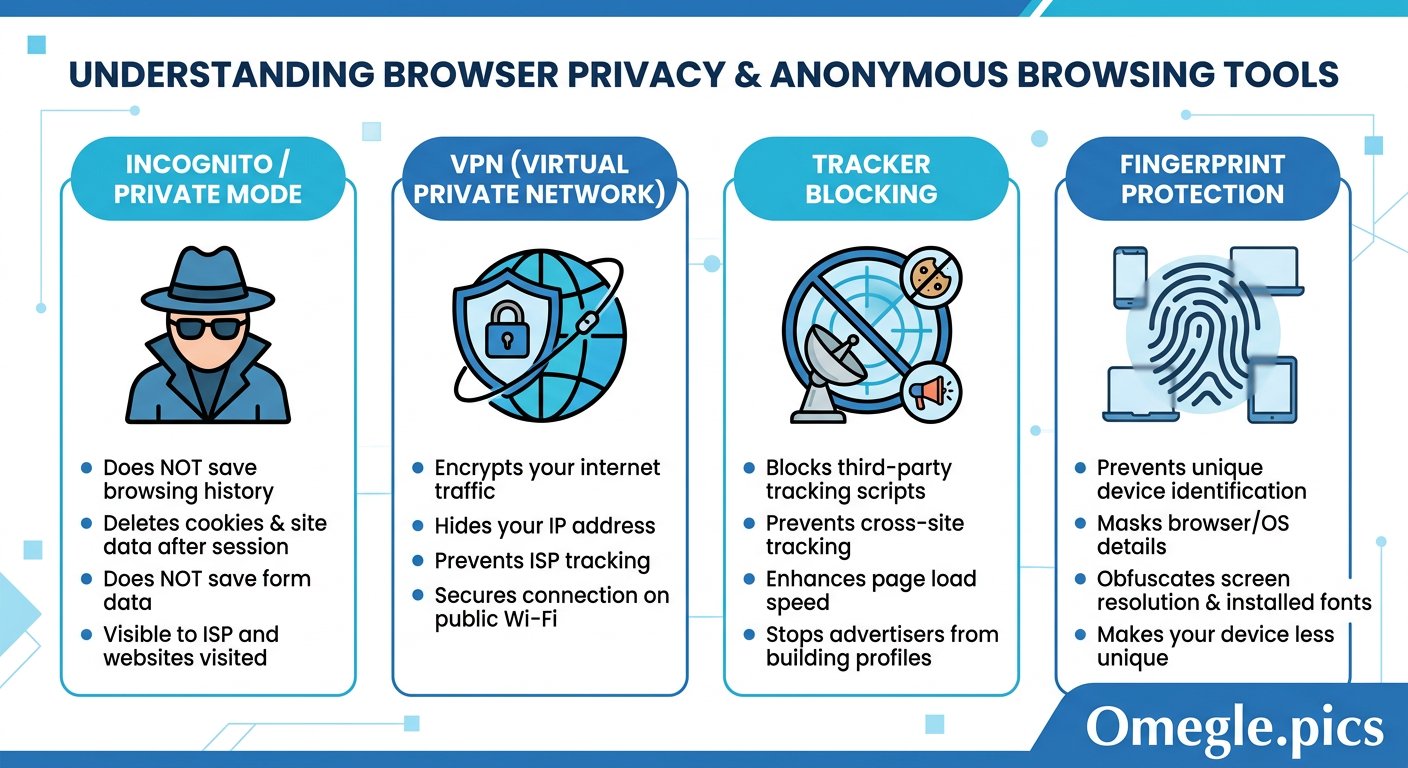
Assuming Incognito Mode Provides Anonymity: Private browsing windows only prevent local storage of history and cookies. Your IP address remains visible, your device fingerprint stays consistent, and your internet provider can still see your activity. Incognito helps with local privacy but does nothing for network-level identification.
Using the Same Browser for Everything: If you use Chrome for daily browsing and video chat, your tracking identifiers and cookies carry over between contexts. Separate browsers or profiles prevent this cross-contamination.
Logging Into Accounts During Chat Sessions: Even with privacy browser settings, logging into Google, Facebook, or other accounts ties your chat sessions to your verified identity. Use chat platforms without being logged into other services for better anonymity.
Keeping Default Browser Fingerprinting: Default browser settings expose substantial device information through fonts, canvas rendering, WebGL characteristics, and screen resolution. Using privacy-hardened browsers or extensions that randomize these signals significantly reduces fingerprinting accuracy.
For deeper understanding of fingerprinting threats, chromethemer’s guide to browser fingerprint protection explains exactly what data points websites collect and how to reduce your fingerprint footprint.
Overlooking Browser Updates: Outdated browsers contain known vulnerabilities that can bypass privacy settings. Keeping your browser current ensures you have the latest anti-fingerprinting protections and security patches.
For additional safety context, see our comprehensive privacy and safety guide covering platform-specific protection strategies.
FAQ — Anonymous Browsing on Omegle Alternatives
Q: Does using a VPN make my browsing completely anonymous?
A: No. A VPN hides your IP address but doesn’t prevent browser fingerprinting, device tracking, or account-based identification. Complete anonymity requires multiple layers: VPN plus privacy browser plus careful account practices plus consideration of what your camera and microphone reveal.
Q: Which browser is best for anonymous video chat?
A: Brave offers the best balance of privacy and usability for most users. It blocks trackers by default, randomizes fingerprint data, and works similarly to Chrome so the learning curve is minimal. For maximum anonymity, Tor Browser standardizes all users to appear identical, though this comes with slower speeds and some site compatibility issues.
Q: How do I know if my browser is being fingerprinted?
A: Visit tools like BrowserLeaks or AmIUnique to see exactly what information your browser exposes. These tools show your fingerprint uniqueness score and which data points make you identifiable. Use this information to understand which protections to prioritize.
Q: Can video chat platforms see my real location if I use privacy tools?
A: Privacy tools hide your IP address and reduce fingerprinting, but platforms can still determine approximate location through other means: timezone settings, language preferences, and WiFi network characteristics. Complete location hiding requires additional techniques beyond browser privacy.
Q: Are browser extensions safe to use?
A: Generally yes, but be selective. Extensions from reputable developers with transparent code are usually safe. Avoid installing many extensions simultaneously—each one adds potential attack surface and can make your fingerprint more unique. Stick to well-known extensions from established organizations like EFF.
Q: Does clearing my browser history make me anonymous?
A: No. Clearing history only removes local records. It doesn’t affect your IP address, device fingerprint, or any tracking done by websites or your internet provider. Clearing history is useful for local privacy but doesn’t provide meaningful anonymity online.
Q: How often should I clear cookies and browsing data?
A: Weekly clearing is reasonable for most users. However, if you’re particularly concerned about tracking, consider clearing more frequently or using browser settings that automatically clear data when you close the browser.
Q: Can I use anonymous browsing on mobile devices?
A: Yes. Privacy-focused browsers like Brave, DuckDuckGo, and Firefox Focus work on mobile devices and provide similar protections to their desktop counterparts. Mobile privacy matters just as much as desktop since phones often have more intimate access to your location, contacts, and personal data.
Anonymous browsing requires combining multiple privacy measures rather than relying on any single tool. Start with a privacy-focused browser, add reputable extensions, use a VPN for network-level protection, and maintain awareness of what information you reveal through your camera and behavior. Each layer adds protection, making comprehensive identification significantly more difficult.